
SDK vs API in health tech: what’s the difference and when to use each
As digital health products become more data-driven, teams increasingly rely on external systems to access and manage health data. Two of the most common components in this ecosystem are APIs and SDKs.
They are often mentioned together and sometimes used interchangeably. However, they serve different purposes and play distinct roles in how applications integrate with wearable devices, health platforms, and data infrastructure.
Understanding the difference between an SDK and an API is key to making better architectural decisions, reducing development time, and building scalable health applications.
What is an API?
An API (Application Programming Interface) is a set of rules that allows different systems to communicate with each other.
In health tech, APIs are commonly used to:
retrieve health data from external platforms
send data between systems
trigger workflows or actions
For example, a wearable API may allow your application to request:
daily step count
sleep summaries
heart rate data
The API defines how you ask for the data and how it is returned, usually through HTTP requests and structured responses like JSON.
What is an SDK?
An SDK (Software Development Kit) is a collection of tools, libraries, and documentation that helps developers build applications or integrate with a platform more easily.
An SDK typically includes:
pre-built functions or methods
authentication handling
data synchronization logic
documentation and examples
In health tech, SDKs are often used for:
integrating mobile health data (e.g., Apple Health, Health Connect)
simplifying authentication flows
managing background data synchronization
Instead of manually calling an API, developers can use an SDK to interact with it through higher-level abstractions.

Key differences between SDK and API
The simplest way to understand the difference:
An API is the interface that exposes data and functionality
An SDK is a toolkit that helps you use that interface more easily
An API tells you what is possible.
An SDK helps you implement it faster.
How they work together
SDKs and APIs are not competing technologies. They are complementary.
In most cases:
the API lives on the server side
the SDK is used on the client side (mobile or web)
For example:
A mobile app uses an SDK to connect a wearable device
The SDK handles authentication and data syncing
The data is sent to an API
The backend processes and stores the data
This layered approach simplifies development and improves reliability.
SDK vs API in wearable integrations
Wearable integrations are a clear example of how both are used.
Using APIs only
If you rely only on APIs, your team must:
implement authentication flows manually
handle data fetching and updates
manage retries, errors, and edge cases
normalize data across providers
This approach offers flexibility but increases complexity.
Using SDKs
With SDKs, much of that complexity is handled for you.
SDKs can:
manage OAuth flows
sync data in the background
handle permissions
structure data before sending it
This reduces development effort, especially in mobile environments.
When to use an API
APIs are essential when:
building backend systems
processing and storing data
creating custom data pipelines
integrating multiple services
They provide full control over how data is handled and used.
When to use an SDK
SDKs are especially useful when:
building mobile applications
integrating device-level data (Apple Health, Health Connect)
reducing implementation time
simplifying complex flows like authentication
They allow teams to move faster without reinventing common functionality.
Common misconceptions
“SDKs replace APIs”. They do not. SDKs often rely on APIs behind the scenes.
“APIs are enough for everything”. In theory, yes. In practice, using only APIs can significantly increase development time and complexity, especially for mobile integrations.
“SDKs limit flexibility”. Good SDKs are designed to simplify common tasks while still allowing access to underlying APIs when needed.
Challenges in health tech
In health tech, the distinction between SDKs and APIs becomes even more important due to:
data fragmentation across devices
strict privacy and compliance requirements
complex authentication flows
variability in data quality and structure
Choosing the right combination of SDKs and APIs can reduce these challenges and improve product reliability.
The role of unified platforms
Modern health data platforms often provide both:
SDKs for easy integration on mobile
APIs for backend processing and data access
This combination allows teams to:
connect devices quickly
receive standardized data
build scalable applications
Instead of choosing between SDK and API, teams can leverage both.
How ROOK approaches SDKs and APIs
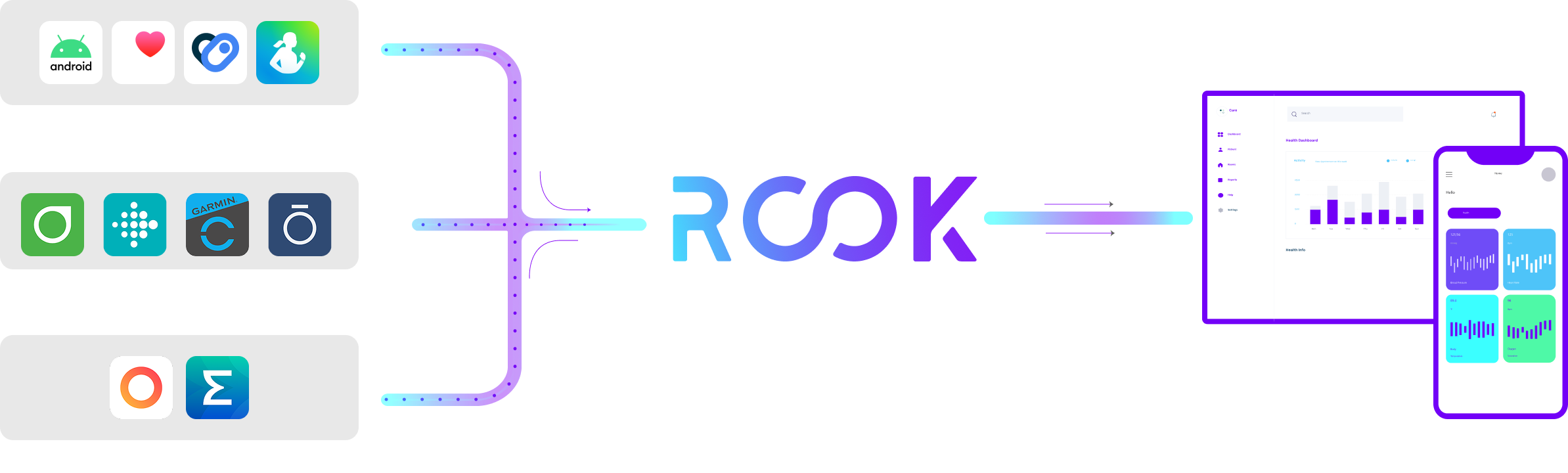
ROOK provides both SDKs and APIs to simplify wearable data integration.
SDKs handle device connection, permissions, and data syncing
APIs provide access to structured, normalized health data
This allows teams to integrate once and work with multiple data sources without managing each provider individually.
Final thoughts
The difference between an SDK and an API is not just technical—it directly impacts how fast you can build, how scalable your system is, and how complex your infrastructure becomes.
In health tech, where data is fragmented and integrations are complex, using the right combination of SDKs and APIs is essential.
Teams that understand this distinction can build faster, reduce maintenance, and focus on delivering real value through health data.