
How to Track Outcomes for ACCESS: BP, HbA1c, Activity, and More
For companies working with the ACCESS model, tracking outcomes is not just about collecting more data. It is about knowing what to measure, how often to measure it, and how to turn those measurements into useful reports, patient follow-up, and program improvements.
The challenge is that outcomes often come from different places.
Blood pressure may come from a connected cuff. Activity data may come from a wearable. Sleep may come from a smartwatch or ring. HbA1c may come from lab results. Weight, heart rate, oxygen saturation, and glucose may come from a mix of medical devices, patient-reported data, and clinical records.
To make ACCESS programs work in practice, companies need a simple and reliable way to track these signals over time.
Start with the outcomes that matter most
Before building dashboards or reports, define the outcomes your program needs to track.
For ACCESS, these may include clinical outcomes, behavioral outcomes, engagement outcomes, and operational outcomes.
Common examples include:
Blood pressure trends
HbA1c changes
Physical activity levels
Step count
Resting heart rate
Sleep duration and quality
Weight changes
Blood glucose trends
Medication adherence
Patient engagement
Device usage consistency
Follow-up completion
The goal is not to track everything at once. The goal is to identify the metrics that connect directly to the patient population, care goals, and reporting needs of the program.
For example, a hypertension program may prioritize blood pressure, resting heart rate, weight, activity, and adherence. A diabetes program may prioritize HbA1c, glucose, activity, sleep, weight, and nutrition-related indicators.
Separate clinical outcomes from daily signals
Not every metric should be treated the same way.
Some outcomes are clinical markers that change slowly. Others are daily signals that help teams understand patient behavior and risk between clinical visits.
Clinical outcomes may include:
HbA1c
Blood pressure
Weight
Lab results
Diagnoses
Medication changes
Daily signals may include:
Steps
Active minutes
Sleep duration
Heart rate
Recovery indicators
Glucose trends
Device usage
Patient-reported symptoms
This distinction matters because clinical outcomes are usually used to evaluate program effectiveness, while daily signals help explain what may be driving those outcomes.
For example, if a patient’s HbA1c improves, activity, sleep, glucose patterns, and adherence data may help explain why. If blood pressure worsens, weight changes, low activity, poor sleep, or inconsistent monitoring may provide important context.
Define a baseline before measuring progress
Outcome tracking only works if there is a clear starting point.
For each patient, establish a baseline using the first reliable measurement or a defined enrollment window. This baseline becomes the reference point for future comparison.
Examples:
Average blood pressure during the first 7 days
Most recent HbA1c before enrollment
Average daily steps during the first 14 days
Average sleep duration during the first week
Initial weight at program start
First 30 days of engagement activity
A baseline helps answer a simple question: is the patient improving, declining, or staying the same?
Without a baseline, reports may show numbers, but they will not show meaningful progress.

Track change over time, not isolated values
One blood pressure reading does not tell the full story. One day of low activity does not mean a patient is disengaged. One poor night of sleep does not indicate a long-term problem.
ACCESS programs should track trends.
For example:
Blood pressure average over 7, 14, or 30 days
HbA1c change across lab cycles
Weekly active minutes
Monthly step count averages
Sleep consistency over time
Weight change month over month
Glucose variability over time
Monitoring adherence by week
This helps teams avoid overreacting to individual data points and focus on meaningful patterns.
The most useful question is not “What happened today?”
It is “What is changing over time?”

Use thresholds to identify patients who need attention
Once outcomes are being tracked, teams need a way to prioritize action.
Thresholds help identify when a patient may need follow-up, support, or clinical review.
Examples of practical threshold logic:
Blood pressure remains above a defined range for several days
Activity drops significantly compared to baseline
Sleep duration decreases for multiple nights
Weight increases quickly over a short period
Glucose readings show repeated high or low patterns
Device data stops syncing
Patient has not completed required monitoring
Engagement drops below expected levels
Thresholds should be designed carefully. The goal is not to generate too many alerts. The goal is to surface the patients who may need attention before the situation becomes more serious.

Combine device data with lab and clinical data
Wearable and device data are powerful, but they become more useful when combined with clinical context.
For ACCESS programs, teams may need to connect:
Wearable data
Medical device data
Lab results
Patient-reported outcomes
Medication information
Care plans
EHR or medical record data
For example, activity and sleep data can help explain changes in blood pressure or glucose control. Lab results can validate whether daily behavior changes are producing clinical improvements. Patient-reported data can add context that devices cannot capture.
The more complete the picture, the better the outcome tracking.

Standardize the data before reporting
One of the biggest challenges in outcome tracking is data inconsistency.
Different devices may use different formats, units, labels, timestamps, and calculation methods. Even when two devices track the same metric, they may produce different outputs.
This creates problems for reporting, analytics, and patient monitoring.
To track ACCESS outcomes reliably, companies need standardized data across sources.
That means:
Consistent metric names
Normalized units
Clean timestamps
Reliable user-device mapping
Deduplicated records
Clear data source identification
Structured event and summary data
Consistent delivery into internal systems
Without standardization, teams may spend more time cleaning data than using it.
Build reports around decisions, not just metrics
Reports should help teams make decisions.
Instead of only showing raw data, ACCESS reports should answer practical questions:
Which patients are improving?
Which patients need follow-up?
Which patients are not syncing data?
Which outcomes are improving across the program?
Which metrics are declining?
Which patient groups need more support?
Are engagement levels strong enough?
Are clinical outcomes moving in the right direction?
Are patients completing required monitoring?
A useful report should help clinical, operational, and business teams understand what is happening and what to do next.
Monitor data availability and patient adherence
Outcome tracking depends on consistent data flow.
If a patient stops syncing their wearable or stops using a connected device, the program may lose visibility. That can affect care decisions, reporting quality, and program performance.
Companies should track:
Last sync date
Device connection status
Missing data periods
Frequency of measurements
Patient adherence to monitoring requirements
Percentage of patients with usable data
Data completeness by metric
Drop-off in device usage
This is especially important for ACCESS programs because missing data can create blind spots.
A patient may not be getting worse. Their device may simply not be syncing. The system needs to know the difference.

Turn outcomes into action
The final goal of outcome tracking is not just reporting. It is action.
When outcomes are tracked correctly, teams can:
Identify high-risk patients earlier
Personalize interventions
Adjust care plans
Improve patient engagement
Measure program performance
Support reimbursement and reporting workflows
Reduce manual follow-up
Improve long-term health outcomes
For example, if a patient’s activity drops and blood pressure rises, the system can trigger a follow-up. If HbA1c improves and engagement remains high, the program can identify what is working. If device data stops syncing, the team can intervene before losing visibility.
Outcome tracking becomes valuable when it helps teams act at the right time.
How ROOK Helps Track ACCESS Outcomes
ROOK helps companies working with ACCESS simplify the way they collect, standardize, and use health data from multiple sources.
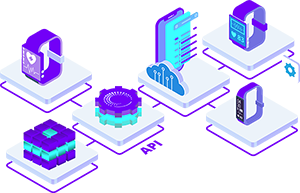
Instead of building and maintaining separate integrations for wearables, medical devices, and health platforms, teams can use ROOK to access structured health data through a single API.
ROOK helps companies work with data such as:
Blood pressure
Activity
Steps
Heart rate
Sleep
Oxygenation
Body metrics
Glucose-related data
Medical device readings
User and source metadata
By standardizing and delivering this data in a consistent format, ROOK makes it easier for teams to build dashboards, alerts, outcome reports, monitoring workflows, and patient engagement experiences.
For ACCESS programs, this means teams can spend less time managing fragmented data infrastructure and more time improving outcomes.
Final Thoughts
Tracking outcomes for ACCESS does not need to be overly complex.
The most practical approach is to:
Define the outcomes that matter.
Establish a reliable baseline.
Track changes over time.
Standardize data from every source.
Use thresholds to identify patients who need attention.
Build reports that support decisions.
Turn insights into action.
The companies that succeed with ACCESS will not be the ones that collect the most data. They will be the ones that turn clean, consistent, and timely data into better decisions, better engagement, and better patient outcomes.