
Understanding Our API: Biomarker Data Structure Vol. 2
In this second volume of our ROOK API deep dive, we explore six important topics that help teams build more accurate and scalable wearable-powered applications:
Granular data
Manual data handling
Auto-detected vs manually started activities
Continuous step events (add-on)
Time zone management
Structured vs unstructured (proprietary) data
If you are building dashboards, leaderboards, real-time interventions, or analytics features, these concepts are essential.
Prefer watching instead? Here’s the full walkthrough on YouTube:
Watch the video on YouTube
Granular data: detailed metrics for advanced visualization
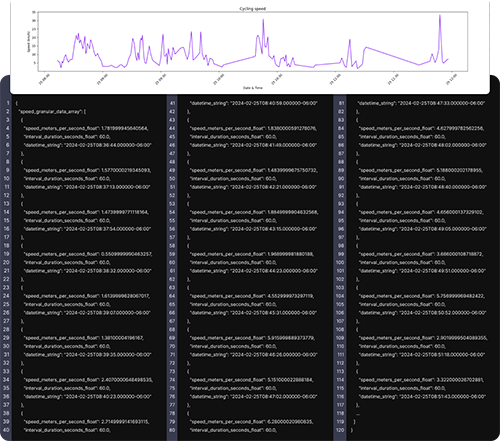
Granular data refers to high-resolution, second-by-second (or near real-time) data points collected during an event such as a workout.
Examples include:
Heart rate curves during a run
Cycling speed over time
Cadence
GPS location points
Power output
Oxygen saturation changes
This type of data allows you to:
Build detailed graphs
Create heat maps of a route
Visualize pace and speed variations
Analyze performance trends
Granular data is available as an optional add-on and can be turned on or off.
Why is it optional?
Because granular data significantly increases payload size. A long activity such as a marathon can generate a large volume of second-by-second data.
You can check which devices support granular data and for which biomarkers directly in our technical documentation under each data source.
Manual data entries: what ROOK passes and what it blocks
Manual data refers to information that a user enters themselves rather than data detected by a wearable.
Examples:
Manually logging a 30-minute run
Entering nutrition information
Adding a custom activity
Manual entries can be useful in certain contexts, especially nutrition tracking. However, manually logged physical activity data is often inaccurate or unreliable.
For this reason, ROOK generally blocks most manual activity data to maintain data quality and consistency.
If you are testing the integration and notice that some manually added data does not appear, this may be the reason.
We also provide detailed guidance in our knowledge base on how manual data handling works across different data sources.
Handling manual data entries in ROOK
Auto-detected vs manually started activities
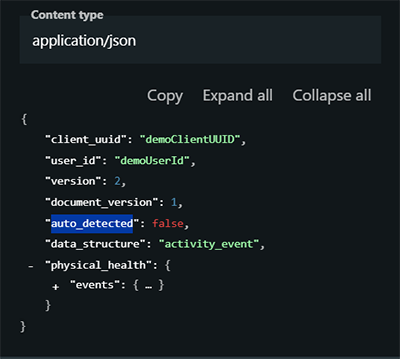
In activity events, you will see a field indicating whether the activity was auto-detected.
Auto-detected activity means:
The wearable detected movement patterns (e.g., walking) automatically.
The user did not explicitly start the workout.
Manually started activity means:
The user pressed “Start Run” or “Start Workout” on their device or app.
The session was actively initiated and ended by the user.
Why this matters:
Auto-detected activities often contain less detailed information than manually started ones. For example:
Granular data may not be available
GPS precision may be limited
Fewer performance metrics may be recorded
If your product depends on high-detail analytics, manually started sessions typically provide richer datasets.
Continuous step events (add-on)
Continuous step events are an optional add-on designed for real-time use cases.
Instead of waiting for the end-of-day summary, this feature:
Sends updated accumulated step counts throughout the day
Generates frequent step events
Keeps dashboards and leaderboards up to date
Ideal use cases:
Corporate wellness challenges
Step competitions
Real-time dashboards
Gamification features
Because step events generate frequent updates, they can increase the number of incoming events. For that reason, this feature can be turned on or off depending on your needs.
Continuous step tracking is available for both API and SDK-based integrations (iOS, Android, and supported frameworks).
Step events (add-on)
Time zone handling: why it is critical
Time zone handling is essential to ensure that:
Daily summaries reflect the correct 24-hour window
Sleep summaries trigger at the right time
Data is grouped accurately by user day
ROOK manages time zones in the following order:
Extract from the user’s mobile operating system or wearable device (preferred).
Accept manually provided time zone information if available.
Fall back to the default time zone configured in the ROOK portal (last resort).
Why this matters:
Users may be located in different time zones. Daily summaries, physical summaries, body summaries, and sleep summaries are triggered based on each user’s local time.
Correct time zone handling ensures data integrity and proper user experience.
Structured vs unstructured (proprietary) data
ROOK standardizes wearable data into structured formats wherever possible.
Structured data
These are comparable metrics across devices, such as:
Heart rate
HRV
Steps
Distance
Calories
Active and inactive time
We normalize these fields so they follow a consistent schema regardless of data source.
Unstructured (proprietary) data
Some manufacturers provide proprietary metrics with unique algorithms behind them.
Examples:
Garmin Body Battery
WHOOP Recovery Score
Oura Readiness Score
Fitness Age
Because these metrics are calculated differently and are not directly comparable across devices, we cannot harmonize them into structured fields.
However, we do not discard them.
Instead, we deliver them in a non-structured data array, allowing you to use them if they are relevant to your use case.
Like other advanced features, non-structured data delivery can be enabled or disabled depending on your integration needs.
Final thoughts
This volume focused on advanced aspects of the ROOK API that directly impact product architecture and user experience:
Use granular data for high-resolution visualization.
Understand how manual data is handled to maintain quality.
Differentiate between auto-detected and manually started activities.
Enable continuous step events for real-time experiences.
Handle time zones correctly for accurate daily summaries.
Combine structured and proprietary data intelligently.
These design decisions allow you to balance performance, payload size, real-time updates, and long-term data consistency.
If you have questions about implementing any of these features, our team is here to help.