
User A
- Baseline
- 60 bpm
- Today's reading
- 70 bpm
Out of range
Health Monitoring learns each user's baseline for resting heart rate, HRV and breathing rate, checks SpO₂ and sleep against fixed ranges, and alerts by webhook.
The problem
Every user generates heart rate, sleep, and oxygen saturation data every day. Reviewing it point by point doesn't scale, and applying the same threshold to everyone produces alerts that mean nothing. Health Monitoring filters that volume and delivers only what has actually changed.
What's normal for each person
A resting heart rate of 70 bpm can be completely normal for one person and a sign of change for another. That's why Health Monitoring compares every measurement with the user's own baseline, calculated from their history, not with a generic average.
User A
Out of range
User B
Within normal range
Illustrative example using ROOK's default thresholds. Each organization can set its own.
The five signals
Every evaluated day comes with a summary covering all five signals. If more complete data for that day arrives later, ROOK re-evaluates it and updates the summary, even withdrawing alerts that no longer apply. Rules can be set for the entire organization or per user, and alerts arrive through the same ROOK Connect webhook.
Resting heart rate, heart rate variability (HRV), and resting breathing rate.
Oxygen saturation (SpO₂), with near-immediate alerts, and sleep duration.
{ "data_structure": "alert_summary", "alerts": { "total_alerts_int": 1, "alert_signals_array": [{ "signal_type_string": "resting_heart_rate", "measured_value_float": 71.0, "baseline_value_float": 60.0, "breach_direction_string": "above", "unit_string": "bpm" }] }}Use cases
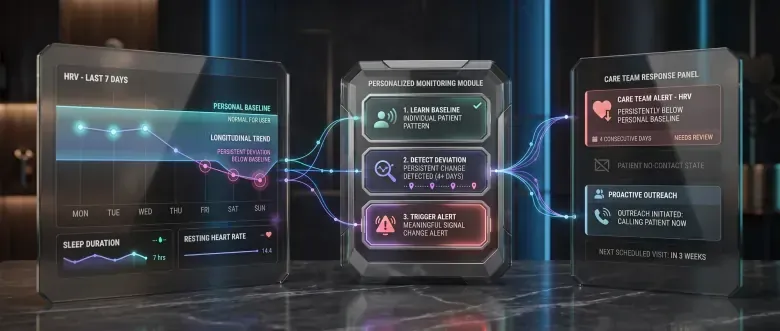 01
01Their HRV has been below their baseline for several days. The remote monitoring program flags it, so the care team can decide whether to reach out before the next visit.
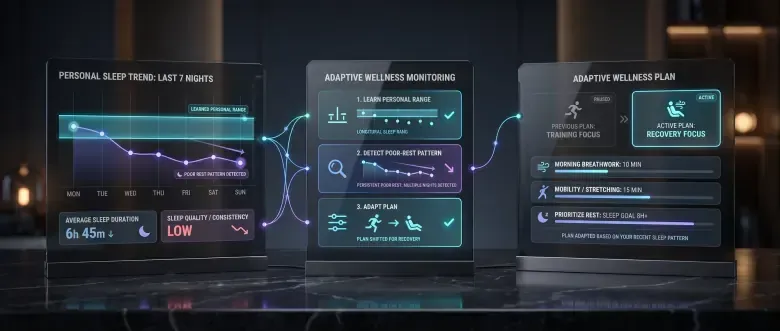 02
02A user's sleep falls below their range several days in a row. The wellness app switches their training plan to a recovery plan.
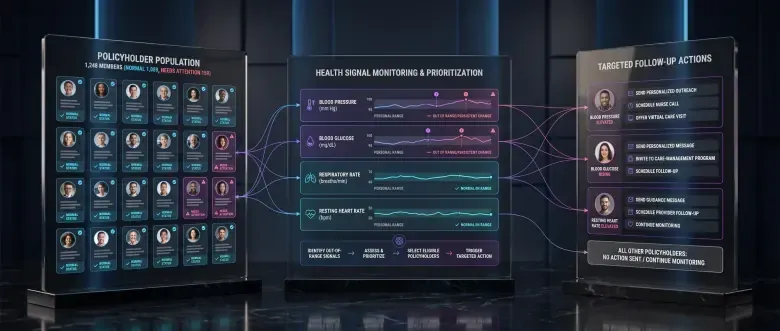 03
03An insurer triggers follow-up actions for policyholders whose signals moved out of range, instead of sending the same message to its entire population.
Health Monitoring
Personalized alerts on top of the existing integration, ready to trigger the follow-up each product defines.
Read more in our technical documentationFAQ
How baselines, thresholds, and alerts work in Health Monitoring.
Health Monitoring evaluates wearable-derived signals already synchronized with ROOK. When a valid measurement falls outside the applicable rule, it generates an alert and delivers it through the existing Data Webhook.
The current version evaluates resting heart rate, heart rate variability, resting respiratory rate, oxygen saturation, and sleep duration. Coverage depends on the source, device, permissions, and synchronization frequency.
A personal baseline is a reference calculated from a user’s valid history for a specific signal. It helps distinguish between a value that is generally high and one that is unusual for that individual.
The baseline is calculated per user and per signal. ROOK can use eligible historical data when available; otherwise, it requires seven valid days for resting heart rate, HRV, and respiratory rate. A signal does not generate alerts until its baseline exists.
In the current version, the baseline remains static after the initial calculation. It does not update continuously with every new data point.
Yes. You can define customer-level or user-level rules through the API. User-specific rules take priority, followed by customer rules and then ROOK default values.
Alerts are delivered as JSON documents through the same Data Webhook configured for ROOK Connect. You do not need a separate webhook for Health Monitoring.
Common causes include fewer than seven valid days to establish a baseline, a signal not being available on the device, incomplete permissions, unsynchronized data, null or invalid values, or a measurement that did not cross the effective threshold. Missing data is never treated as an alert.
Not to calculate baselines, evaluate thresholds, and generate alerts within the product’s current scope. Your team must still define the experience, review, or action triggered after each alert is received.
Not in the current version. Each signal is evaluated independently. Multi-day trend monitoring, combined signals, predictions, and recommendations are not part of the current product.
No. Health Monitoring does not guarantee emergency response latency or continuous clinical monitoring. Customers must design their workflows and communications for the permitted use and level of risk.
The ROOK documentation explains activation, prerequisites, supported signals, rule and threshold configuration, alert payloads, and troubleshooting.
View technical documentationNo questions match that yet. Try another word or topic.
Health Monitoring is a health-tracking feature. It is not an emergency or diagnostic system, and clinical interpretation remains with qualified healthcare professionals.